 </img>
Beegru Marketplace
Beegru gets properties
 is how long it took all contributors to get here!
Installation
-
You’ll need to install Node.js and npm to begin. Once you’ve done that, clone this repository and run
npm install -
Now there’s two things you can do. You can either build the application and run a production version or you can run the development version from the get-go.
-
To run the development version, run
npm run devThe application will then run at http://localhost:3000/.
-
To run the production version, run
bash build.shand then
npm startThe application will then run at http://localhost:6911/.
-
Usage
If you have access to this repository, then you must already know how to use this application. If you don’t, you must know someone who can walk you through. In any case, feel free to explore!
Build status
The production version of this application is hosted on Vercel which unfortunately does not offer any status badges. However, we created one ourself for your convenience! Make sure that this badge shows a positive status before you clone this repository. It can save you hours of trouble!
 </img>
Twice nightly rebuilds are triggered automatically by a GitHub Action called Twice Nightly Rebuild at 04:20 (IST) and 16:20 (IST) everyday. These help in ensuring that the last commit is always the one that’s deployed for both the dev and master branches.
Lighthouse Reports
Lighthouse reports for this project are available on the Beegru Documentation sub-site. Since there is no way to browse them, you can find direct links to specific reports in the tables below.
Desktop Tests
Mobile Tests
Automation
-
Sync With AWS S3
There is a GitHub Action called Sync Public Directory With S3 that runs every time someone pushes a commit to this repository. It synchronises all the files in the
public/directory with the public S3 bucket for this project (cdn.beegru.com). This prevents unnecessary round-trips to the S3 bucket to manually upload files or face 404s and 403s every time someone forgets to upload a required file to the S3 bucket. -
Image Optimisation API
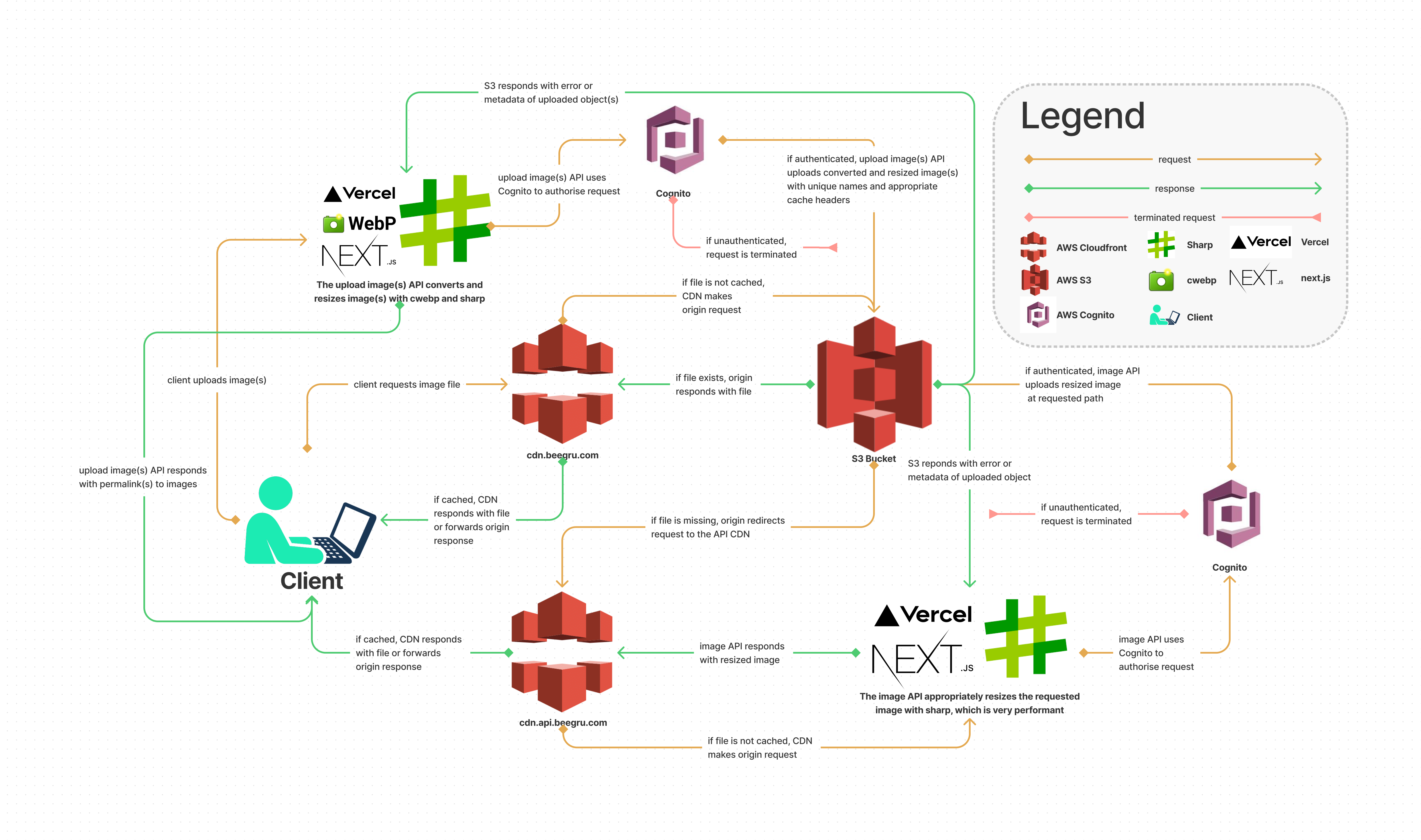
Now of course Next,js offers its own image optimisation API through the next/image module. However, this API service is only available after an app has already been built and deployed. You can learn more about this issue by clicking **[this link](https://nextjs.org/docs/messages/export-image-api “export-image-api Next,js”). Since we want our app to be able to be deployed using statically generated files on any external platform, we make extensive use of the **next export utility. In fact, if you read build.sh (this app’s primary build script) you’ll find that it excludes certain features of the app like internationalised routing and image optimisation just so it can statically export the application. Since we cannot make use of the next/image module, we had to come up with our own method of optimising images. Say hello! to the image optimisation API. This API is available on all images uploaded through the
public/images/uploads/directory. Since this directory is synced with a public S3 bucket (cdn.beegru.com), the base URL of the API becomeshttps://cdn.beegru.com/images/uploads/. Now let’s assume that there is a file calledwater-mountain.jpgstored at https://cdn.beegru.com/images/uploads/water-mountain.jpg. Here are all the things you can do with it:-
Convert it. By default, this API always returns an optimised WebP file except when the original file is requested with no modifications. To convert it without changing anything else, use the following route.
/water-mountain.jpg/webp -
Convert it and then get a blurred version of the image to use as an LQIP.
/water-mountain.jpg/webp/blur -
Resize the image. Here,
<width>and<height>are integers./water-mountain.jpg/<width>/<height> -
Resize the image but get the blurred LQIP version.
/water-mountain.jpg/<width>/<height>/blur -
If resizing the image to a 1:1 aspect ratio, the API provides a shorthand route.
/water-mountain.jpg/<width||height> -
The shorthand route for 1:1 aspect ratio also accepts the
bluroption to produce a blurred LQIP version of the same image./water-mountain.jpg/<width||height>/blur
When used in conjunction with the HTML 5
<picture>tag, it can be used to generate several sizes of the same image for different screen sizes using media queries and the produced effect is at par with the next/image module. You can explore thecomponents/example-components/WaterMountain.tsxfile for a quick walkthrough of this process. All generated images are stored at a path that matches the API request format on the public S3 bucket. This means that the expensive image optimisation process is only ever carried out once. All subsequent requests return a pre-generated image directly, meaning there is zero wait time. Below is an image that explains the architecture of this API.You can click on the above image to download the file so you can zoom in if needed.
-
-
Build Script
The build script is written in bash and is responsible for the following actions:
- Change the app environment to production by editing a few environment variables.
- Remove non-export features from next.config.js and the statically export the app.
- Copy over the freshly exported files from the
out/to thepublic/directory. - Delete (if any) old
public/sitemap.xml. - Generate a new
public/sitemap.xmlby looping through all the files inside thepublic/directory. - Add non-export features back to next.config.js and then build the app for a production deployment.
- Change the app environment to development by editing a few environment variables (local only).
 </img>
Road map
This project is divided into several phases with each phase adding more features. We actively update this section, so do keep an eye out. If you’re interested in gaining a more in-depth understanding of this application, just follow the projects tab for this repository.
Contributing
If you’re an active member of the Beegru/design-and-dev team, you must already be up-to-date with our internal contribution guidelines. If you’re not, then you must know someone who can walk you through.
If you’re an external contributor to this repository, know that pull requests are always welcome. But if you’re proposing a major change, make sure to open an issue and have a discussion before making a pull request.
But in general,
-
Commit your code to the default branch (dev) only.
-
Run a lighthouse test on all pages and ensure a perfect score in all metrics with the exception of performance. Performance can be any number above 70. Remember to run the lighthouse tests on the production version of the application for obvious reasons.
-
And lastly, before you push anything upstream, run
npm run lintand
bash build.shto ensure that there are no issues.
If you want to read all the contribution guidelines, head over to CONTRIBUTING.md.
Support
If you don’t know where to begin or are feeling particularly inquisitive about the project, feel free to send an email to tech@beegru.com and someone will promptly help you out.
License
You’ll notice that this repository has a WTFPL license. That’s because if you have access to this repository, we trust you fully and want you to know that you have the freedom to write code in any way you see fit. Of course, this license DOES NOT grant you the right to spread this project publicly. This is a fully private project with and is owned and protected by Beegru Technologies Private Limited. Any further distribution requires explicit consent from the aforementioned organisation. The WTFPL License is only there as a goodwill gesture to let contributors such as yourself know that they have the freedom to write code in any manner they see fit.
If you want to read the license, head over to LICENSE.md.
Authors and acknowledgements
- Designed by Kishore, Arul, Muthu, Muniyappan, Abhinav and Dhanush.
- Written by Nidal, Samuel, Neeta, Sarath, Kiran, Annon, Pravath and Siddhant.
- Tested by Aditya and Subrath
- Conceptualised and brought to you by Shreeraj.
More Information
If you’d like to take a deep dive into how this application is built, visit https://docs.beegru.com. It’s got things like algorithms, architectures and philosophies of various features. Of course, all of this information is confidential and if you’re working on this project, then you know exactly who you must talk to in order to gain access.